

AWS Bedrock with .NET: Conversational AI Converse API


The Problem & The Solution
Picture a customer contacting your support bot about a billing issue. They explain the problem, the bot asks for their account number, they provide it — and then the next response treats them like a stranger. No memory of the account number. No memory of the issue. The user has to start over.
This is what happens when you build conversational experiences on stateless, single-turn APIs. Every message is an island. The model sees no history, carries no context, and the user experience suffers for it.
The Converse API is AWS Bedrock's answer to the growing demand for natural, multi-turn, context-aware conversations with generative AI models. As businesses and developers began integrating AI into customer support, virtual assistants, and workflow automation, it became clear that single-turn, stateless APIs (like the original Invoke API) were not enough. Users expect AI to remember context, follow up on previous questions, and provide a seamless, human-like experience.
The Converse API was introduced to fill this gap. It allows developers to send the entire conversation history to the model, enabling the AI to generate responses that are aware of everything said so far. This is a major step forward for building chatbots, support agents, and assistants that feel truly interactive and intelligent.
🔮 Understanding Converse API
Why Did AWS Create It?
- Context Retention: Real conversations require memory. Converse API lets you pass the full message history, so the model can reference earlier turns and maintain continuity.
- Multi-Turn Dialogues: Many business scenarios (support, sales, onboarding) require back-and-forth exchanges, not just one-off answers.
- Better User Experience: Users expect AI to "remember" what they said. Stateless APIs break this illusion and frustrate users.
- Enterprise Integration: Converse API is built for production, with IAM, monitoring, and cost controls.
In summary, Converse API exists because real-world AI needs to be conversational, not just responsive.
When and Where to Use It
- Customer Support: Multi-step troubleshooting, order tracking, and escalation flows.
- Virtual Assistants: Scheduling, reminders, and task management that require context.
- Education: Tutoring bots that guide users through lessons and remember progress.
- Healthcare: Symptom checkers and patient intake bots that need to remember previous answers.
- Internal Tools: HR, IT, and operations bots that help employees with ongoing requests.
- Any scenario where context, continuity, and memory are essential for a good user experience.
🏗️ Technical Foundations
Converse API vs. Invoke API
- Invoke API: Stateless. Each request is a single prompt/response. No memory of previous turns. Simpler, but limited for conversations.
- Converse API: Stateful. You send the full conversation history (as a list of messages). The model can reference, summarize, or clarify based on prior turns.
Technical Note: With Converse, you are responsible for maintaining and sending the conversation history. This gives you control, but also means you must manage message length and context window limits.
- When to use Invoke: Single-shot Q&A, summarization, or content generation.
- When to use Converse: Chatbots, support agents, assistants, and any workflow with back-and-forth dialogue.
How the Converse API Flows End to End
Before we implement any code, let's visualize the full request lifecycle — from your .NET application calling the SDK, through Bedrock's Converse API, down to the Foundation Model, and back. Notice the multi-turn conversation loop and the tool use capability — both are native to the Converse API and impossible with InvokeModel.

💻 Implementation Guide
1. Prerequisites
- AWS account with Bedrock access enabled.
- AWS credentials with permissions for Bedrock Converse API.
- .NET 8 or later SDK installed.
- NuGet package: AWSSDK.BedrockRuntime
2. Service Implementation Example
Below is a simplified version of a customer support agent using the Bedrock Converse API in C#. The agent maintains conversation history and provides context-aware responses.
using Amazon.BedrockRuntime;
using Amazon.BedrockRuntime.Model;
using System;
using System.Collections.Generic;
using System.Threading.Tasks;

public class BedrockCustomerSupportService
{
    private readonly AmazonBedrockRuntimeClient _client;
    // NOTE: Verify the latest Claude model ID in the AWS Bedrock console.
    // This example uses Claude 3 Haiku as of Jan 2026 — model IDs may change.
    private const string ModelId = "anthropic.claude-3-haiku-20240307-v1:0";

    public BedrockCustomerSupportService()
    {
        _client = new AmazonBedrockRuntimeClient(Amazon.RegionEndpoint.USEast1);
    }

    /// <summary>
    /// Simulates an AI customer support staff in a multi-turn conversation using the Bedrock Converse API (no tools).
    /// </summary>
    /// <param name="conversationHistory">The full conversation history as a list of Message objects (user and assistant turns).</param>
    /// <returns>AI-generated customer support response as plain text.</returns>
    public async Task<string> GetSupportResponse(List<Message> conversationHistory)
    {
        var converseRequest = new ConverseRequest
        {
            System = new List<SystemContentBlock>
            {
                new SystemContentBlock
                {
                    Text = "You are an AI customer support staff. Be polite, helpful, and concise. Address the customer's issue and provide clear next steps or solutions. Maintain context across the conversation."
                }
            },
            ModelId = ModelId,
            Messages = conversationHistory
        };

        var response = await _client.ConverseAsync(converseRequest);

        var responseText = string.Empty;
        foreach (var content in response.Output.Message.Content)
        {
            if (content.Text != null)
            {
                responseText += content.Text;
            }
        }

        return responseText;
    }
}
3. How the Example Works
- System Prompt: Sets the behavior and tone for the AI agent.
- Model Selection: Uses Anthropic Claude 3 Haiku for fast, cost-effective responses.
- Conversation History: Passes the entire message history to maintain context.
- Response Handling: Aggregates the AI's response from the output content blocks.
4. Example Use Case: AI Customer Service Agent
Suppose a user is troubleshooting an issue with their order. The conversation might look like this:
    // Example conversation history — showing 5+ turns to demonstrate context retention
    var conversationHistory = new List<Message>
    {
        new Message { Role = "user", Content = new List<ContentBlock> { new ContentBlock { Text = "My order hasn't arrived yet. I ordered it last week." } } },
        new Message { Role = "assistant", Content = new List<ContentBlock> { new ContentBlock { Text = "I'm sorry to hear that. Can you provide your order number? And what's your delivery address region?" } } },
        new Message { Role = "user", Content = new List<ContentBlock> { new ContentBlock { Text = "It's order 12345, and I'm in the East Coast region." } } },
        new Message { Role = "assistant", Content = new List<ContentBlock> { new ContentBlock { Text = "Thanks! Order 12345 was shipped 5 days ago to the East Coast. It should arrive within 2-3 days. Would you like me to track it further or escalate this?" } } },
        new Message { Role = "user", Content = new List<ContentBlock> { new ContentBlock { Text = "Can you escalate this to a human agent? I'm concerned since it's been a week." } } }
    };

    var service = new BedrockCustomerSupportService();
    string response = await service.GetSupportResponse(conversationHistory);
    Console.WriteLine(response);
Notice how in turn 4, the AI references "Order 12345" and "East Coast region" seamlessly — context from earlier turns. This multi-turn awareness is exactly what Converse API enables. The AI doesn't forget, and the user experience feels natural.
5. Demo: Interactive Customer Support Chat
Below is a complete demo of a console-based customer support chat using the Bedrock Converse API. This example shows how to maintain the conversation loop, collect user input, and keep the conversation history updated for each turn.
    // Customer support chat demo
    async Task RunBedrockCustomerSupportChat()
    {
        try
        {
            var supportService = new BedrockCustomerSupportService();
            var conversation = new List<Amazon.BedrockRuntime.Model.Message>();
            Console.WriteLine("\nWelcome to AI Customer Support! Type 'Exit Chat' to end the conversation.\n");
            while (true)
            {
                Console.Write("You: ");
                var userInput = Console.ReadLine();
                if (string.Equals(userInput, "Exit Chat", StringComparison.OrdinalIgnoreCase))
                {
                    Console.WriteLine("\nThank you for chatting with AI Customer Support. Goodbye!\n");
                    break;
                }
                // Add user message to conversation
                conversation.Add(new Amazon.BedrockRuntime.Model.Message
                {
                    Role = "user",
                    Content = new List<Amazon.BedrockRuntime.Model.ContentBlock>
                    {
                        new Amazon.BedrockRuntime.Model.ContentBlock { Text = userInput }
                    }
                });

                // Get AI response
                var response = await supportService.GetSupportResponse(conversation);

                // Add assistant response to conversation
                conversation.Add(new Amazon.BedrockRuntime.Model.Message
                {
                    Role = "assistant",
                    Content = new List<Amazon.BedrockRuntime.Model.ContentBlock>
                    {
                        new Amazon.BedrockRuntime.Model.ContentBlock { Text = response }
                    }
                });

                Console.WriteLine($"AI: {response}\n");
            }
        }
        catch (Exception ex)
        {
            Console.WriteLine($"Error: {ex.Message}");
            Console.WriteLine(ex.StackTrace);
        }
    }
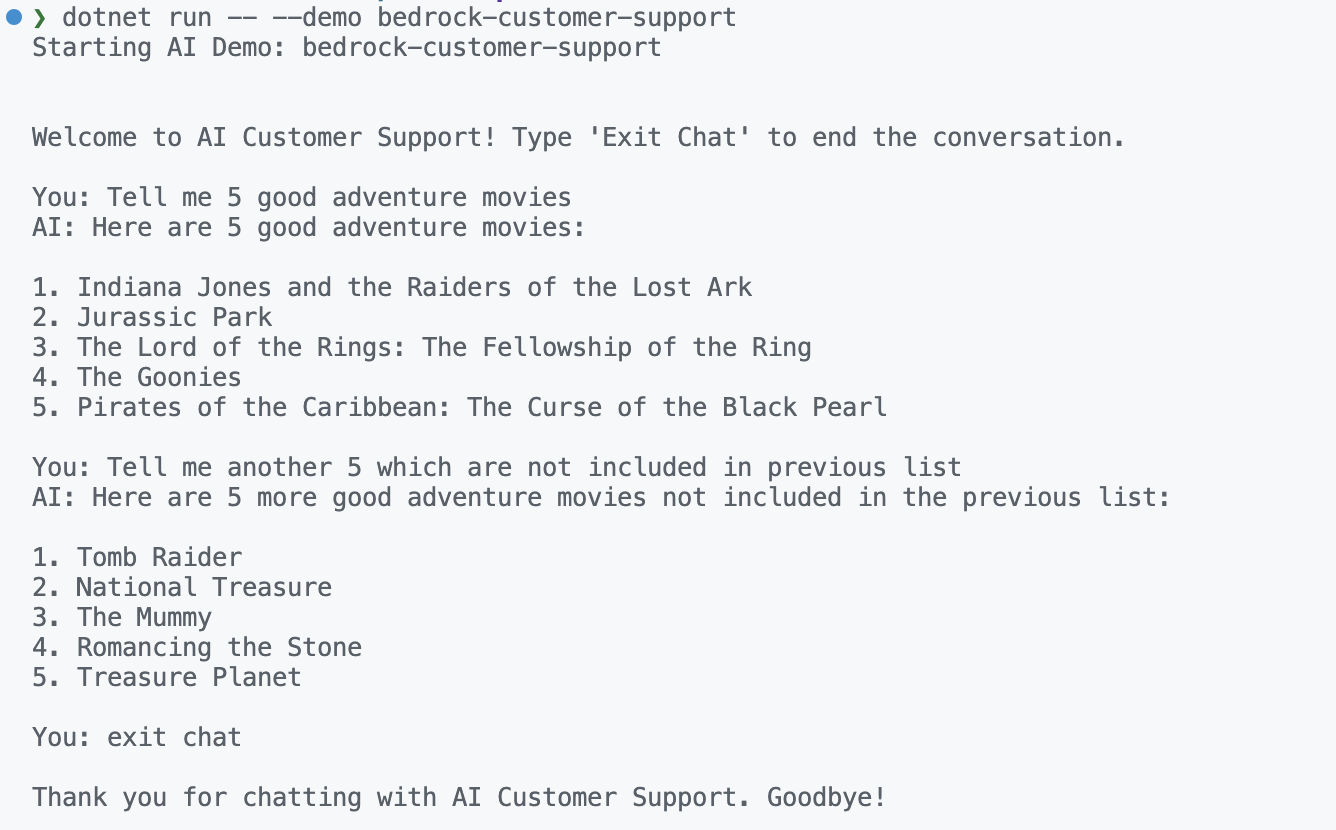
This interactive loop demonstrates how to build a real-time, multi-turn customer support chat using the Converse API. The conversation history is updated after every user and AI message, ensuring context is preserved throughout the session.
Below is a screenshot of the actual customer support chat demo in action, where the AI answers questions about movies and maintains context across turns.
Summary
- What: The Bedrock Converse API enables multi-turn, context-aware conversations with generative AI models.
- When: Use it for chatbots, customer support, and any scenario requiring context retention and continuous dialogue.
- How: Integrate with AWS SDK for .NET (.net 8+), maintain conversation history as a list of Message objects, and pass the entire history with each request so the model sees full context.
The beauty of Converse API is its simplicity — you don't need to manage complex state servers or reinvent conversation patterns. AWS handles the heavy lifting, and you focus on building great user experiences.
References & Further Reading
- AWS Bedrock with .NET: Getting Started — foundation article for IAM, authentication, and cost optimization
- AWS Bedrock Converse API Documentation — official AWS reference
- BedrockCustomerSupportService.cs on GitHub — full runnable example
For reference, the code repository being discussed is available at github: https://github.com/ajaysskumar/ai-playground/blob/main/AwsBedrockExamples/Services/BedrockCustomerSupportService.cs
Thanks for reading through. Please share feedback, if any, in comments or on my email ajay.a338@gmail.com