

Streaming APIs in .NET: What, When, and How


🚰 What If Your API Could Talk While It Thinks?
Picture this: you click Generate Report in your application, and then... nothing. The spinner keeps spinning. You start wondering whether the server is working, whether the request got stuck, or whether you should refresh the page and risk making it worse. Most APIs are like that quiet restaurant kitchen where you place an order and hear absolutely nothing until the dish either arrives or never does.
But what if the API could behave more like a chef cooking at an open counter? First you hear, "Order received." Then, "Vegetables chopped." Then, "Sauce is ready." Then finally, "Dish is served." Suddenly the wait feels shorter because you can see progress happening in real time.
That is the core idea behind streaming APIs. Instead of making the client wait for one giant response at the end, the server sends useful pieces of data as they become available. For chat applications, that might be words appearing one by one. For dashboards, it might be live updates. For long-running jobs, it might be progress events.
🌊 What Is a Streaming API?
A streaming API is an API that sends data in multiple chunks over time instead of returning the complete response in one go. Think of a normal API response as getting an entire book delivered in a sealed box. A streaming API feels more like reading a newspaper being printed line by line as the presses run.
In a traditional request-response flow, the client sends one request, the server does all the work, and only then sends back the full payload. With streaming, the connection stays open and the server keeps pushing small messages while work is in progress.
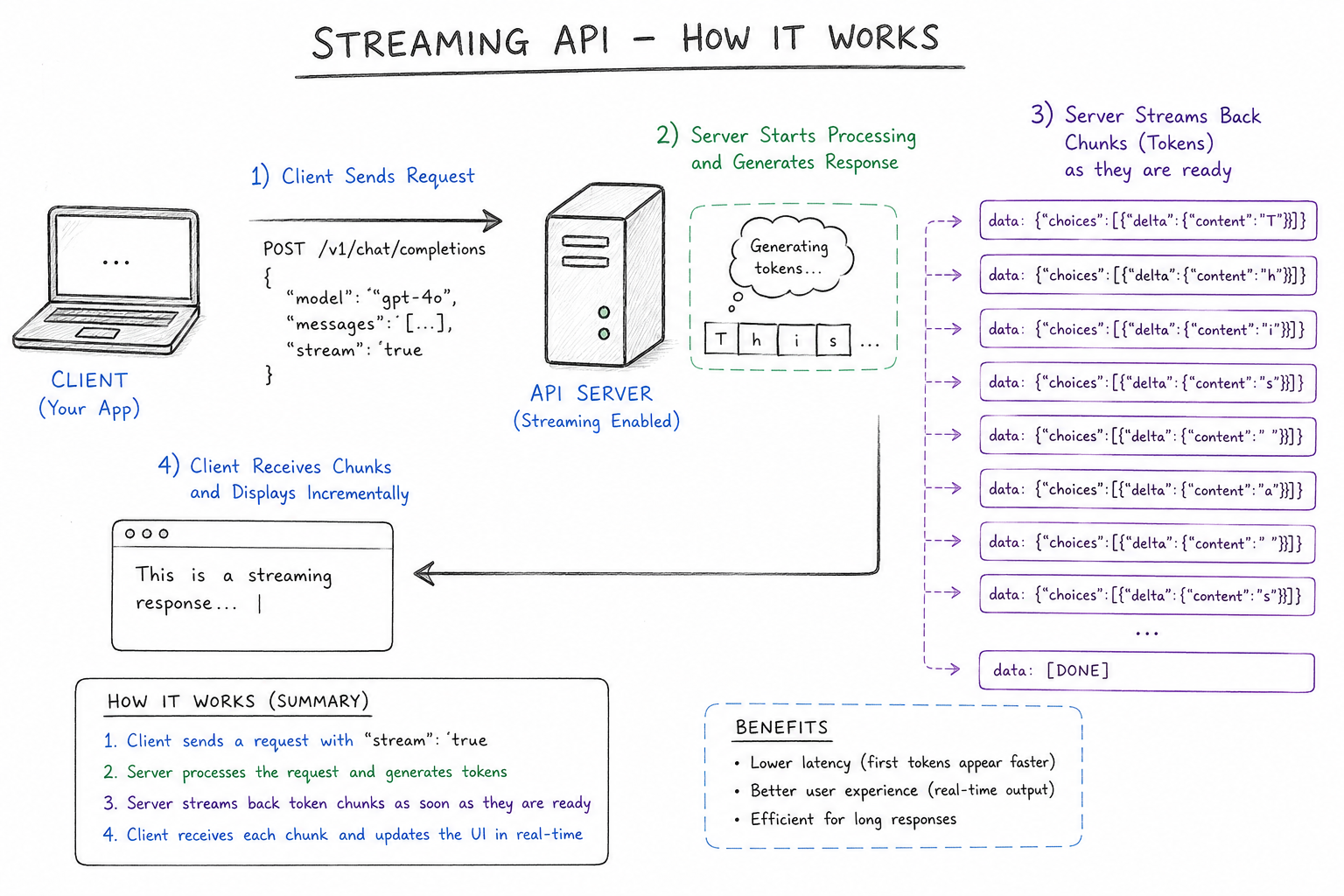
| Aspect | Traditional API | Streaming API |
|---|---|---|
| Response timing | One final response after all work is done | Multiple partial responses while work is happening |
| User experience | Wait, then receive everything | See progress immediately |
| Best for | Fast CRUD calls and small payloads | Long-running work and real-time updates |
| Connection style | Short-lived | Open for longer while chunks arrive |
The Common Shapes of Streaming
Not every streaming API looks the same. The three most common approaches are:
- Server-Sent Events (SSE): Great when the server only needs to push updates to the client over regular HTTP.
- WebSockets: Best when both client and server need full two-way, low-latency communication.
- gRPC streaming: Common in service-to-service systems where performance and typed contracts matter.
The demo in this article uses Server-Sent Events because it is the easiest way to explain the concept. It keeps the mental model simple: the server writes messages, and the client reads them as they arrive.
🎯 When Should You Use Streaming APIs?
Streaming is useful when the user benefits from receiving partial results early. If the final answer is expensive to compute, if updates keep changing, or if the client needs progress rather than silence, streaming is usually a better fit than a single buffered response.
Real-World Cases Where Streaming Shines
- AI chat APIs: OpenAI, Anthropic, and AWS Bedrock stream generated text token by token so the answer starts appearing before the full model output is ready.
- Code assistants: Tools like GitHub Copilot feel responsive because suggestions can be produced progressively instead of waiting for one large completion payload.
- Market data APIs: Stock and crypto platforms stream price ticks because sending a fresh full response every second would be wasteful and slow.
- Infrastructure watch APIs: Kubernetes watch endpoints stream resource changes so clients can observe pod or deployment updates in near real time.
- Build and deployment logs: CI/CD systems often stream log output so you can watch a build fail at step 3 instead of waiting five minutes for a giant error dump.
- Progress-heavy business workflows: Video processing, report generation, file imports, and ETL jobs can stream milestones like queued, validating, transforming, and completed.
When Streaming Is Overkill
Streaming is powerful, but it is not a default choice for every endpoint. If your API returns a small object in 50 milliseconds, there is no benefit in keeping the connection open and delivering the object in pieces.
🛠️ How Does a Streaming API Work?
Let us walk through the simplest mental model possible. Our in-house demo has two parts: a server that sends messages one at a time, and a client that reads those messages one at a time. That is enough to understand the entire pattern.
Step 1: The Server Keeps the Connection Open
Instead of calculating everything and returning once, the server marks the response as text/event-stream. Then it writes small lines of text, flushes them, waits a bit, and repeats. Each flush pushes data to the client immediately.
private async Task HandleRequest(HttpListenerContext context)
{
    var response = context.Response;
    response.ContentType = "text/event-stream";
    response.Headers.Add("Cache-Control", "no-cache");
    response.Headers.Add("Connection", "keep-alive");

    using var writer = new StreamWriter(response.OutputStream, Encoding.UTF8, leaveOpen: true);

    var messages = new[]
    {
        "Starting data transmission",
        "Chunk 1: Processing request",
        "Chunk 2: Analyzing input",
        "Chunk 3: Generating response",
        "Chunk 4: Almost done",
        "Chunk 5: Complete!"
    };

    foreach (var msg in messages)
    {
        await writer.WriteLineAsync($"data: {msg}");
        await writer.WriteLineAsync();
        await writer.FlushAsync();
        await Task.Delay(1500);
    }

    await writer.WriteLineAsync("data: [DONE]");
    await writer.FlushAsync();
    response.Close();
}
Code Sample #1 : Server sending chunks using Server-Sent Events
There are two important details here. First, each message is prefixed with data:, which is the standard SSE format. Second, FlushAsync() is what makes the data visible to the client right away. Without flushing, the server may buffer the output and the client would not feel the stream.
Step 2: The Client Starts Reading Before the Server Finishes
On the client side, the key is to read the response as a stream, not as one finished string. That is why the demo uses HttpCompletionOption.ResponseHeadersRead. It tells HttpClient: "Give me the response as soon as headers arrive. I will read the body myself as it comes in."
public static async Task ConsumerAsync()
{
    using var client = new HttpClient();

    using var response = await client.GetAsync("http://localhost:8080/stream",
        HttpCompletionOption.ResponseHeadersRead);

    using var stream = await response.Content.ReadAsStreamAsync();
    using var reader = new StreamReader(stream);

    while (!reader.EndOfStream)
    {
        var line = await reader.ReadLineAsync();
        if (string.IsNullOrWhiteSpace(line)) continue;

        if (line.StartsWith("data: "))
        {
            var data = line.Substring("data: ".Length);
            if (data == "[DONE]")
            {
                break;
            }

            Console.WriteLine($"Received: {data}");
        }
    }
}
Code Sample #2 : Client reading streaming data line by lineThis is the moment streaming becomes real. The client is no longer waiting for the last byte of the response. It is reacting chunk by chunk. That same pattern powers AI typing effects, live dashboards, and log viewers.
Step 3: A Minimal End-to-End Example
The snippet below is the final bootstrap step, assuming the server and consumer methods shown earlier are already defined.
public static async Task Main(string[] args)
{
    var server = new StreamingServer();

    var serverTask = server.StartAsync();
    await Task.Delay(1000);

    try
    {
        await ConsumerAsync();
    }
    finally
    {
        server.Stop();
    }
}
Code Sample #3 : Final bootstrap step for the already-defined streaming server and client🧭 Choosing the Right Streaming Style
Once the concept clicks, the next question is usually: Which transport should I pick? A good rule of thumb is to match the tool to the communication pattern.
- Use SSE when the server needs to push a steady stream of updates to a browser or client and the client mostly listens.
- Use WebSockets when both sides need to send messages freely, like chat rooms, multiplayer games, or collaborative editing.
- Use gRPC streaming when services talk to services and you want strong contracts, binary efficiency, and high throughput.
One simple way to remember the difference is this: SSE is one-way, from server to client, while WebSockets are two-way, allowing both sides to send messages whenever they need to.
In other words, SSE is like a radio broadcast, WebSockets are like a phone call, and gRPC streaming is like a private fiber line between two offices.
✅ Summary
Streaming APIs solve a very human problem: waiting in silence feels slow and uncertain. By sending data progressively, they make applications feel alive, responsive, and trustworthy.
- What: A streaming API delivers multiple chunks over time instead of one final payload.
- When: Use it for AI responses, logs, market feeds, progress-heavy jobs, and live state updates.
- How: Keep the connection open, flush chunks from the server, and read them incrementally on the client.
If you remember one thing from this article, let it be this: a streaming API is not magic. It is just a polite API that does not wait until the very end to start talking.