

AWS Bedrock with .NET: Guardrails for Safe AI Applications


The Problem: An AI With No Boundaries
Picture this: your team ships a customer support chatbot powered by AWS Bedrock. Within a week, you get a support ticket — a user tricked the bot into writing Python code, another coaxed it into sharing someone else's email address from a previous response, and one sent a barrage of hateful messages that the model cheerfully responded to.
You didn't build a bad AI. You built one with no guardrails.
In the real world, AI models are powerful but they don't know where the boundaries are — unless you tell them. That's exactly what AWS Bedrock Guardrails are for.
🛡️ What Are AWS Bedrock Guardrails?
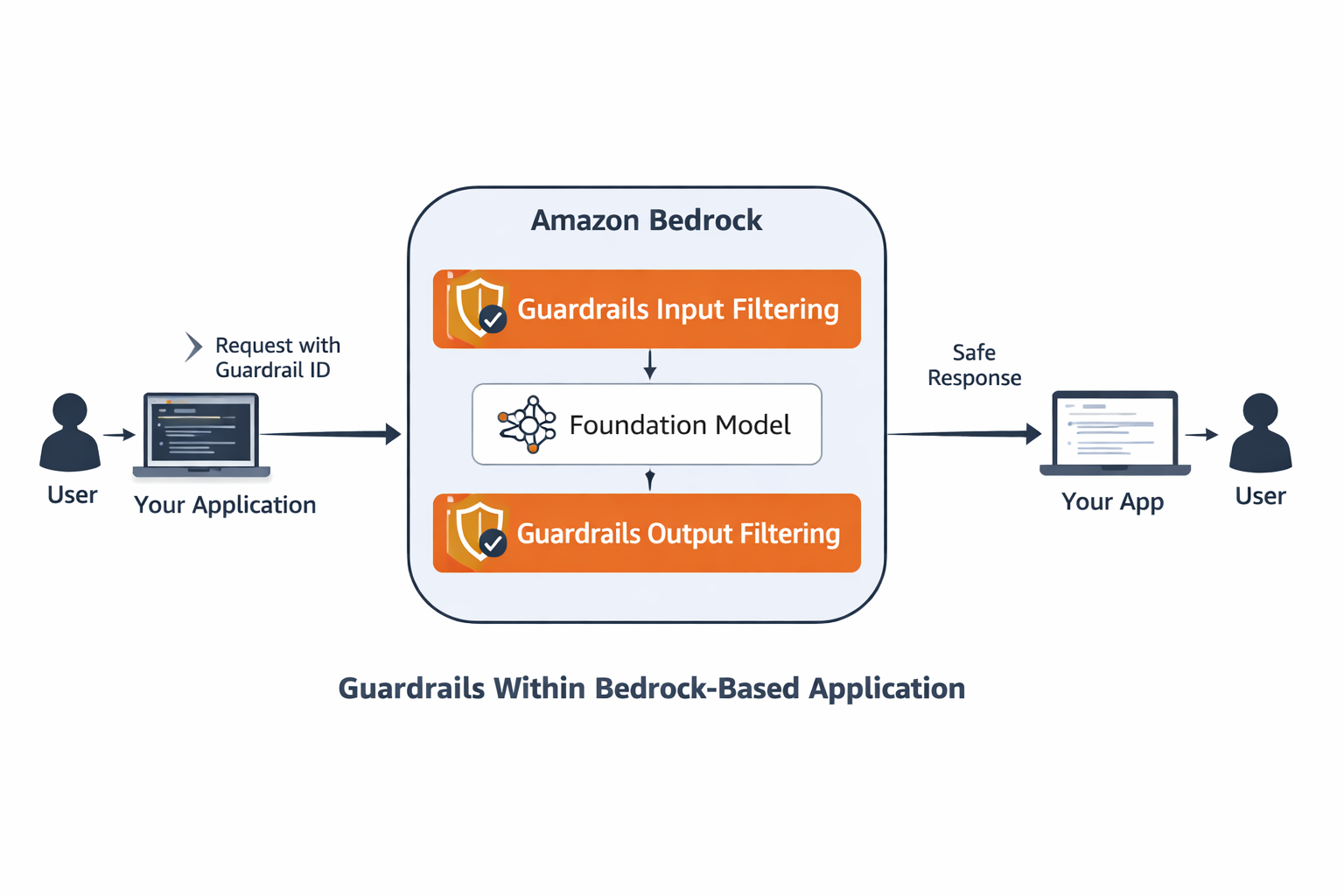
AWS Bedrock Guardrails are a configurable safety layer you attach to your AI model calls. Think of them as a strict — but invisible — security guard standing between your users and the model.
Before the user's message even reaches the model, the guardrail inspects it. After the model responds, the guardrail checks the output too. If anything violates your policy — hateful language, off-topic requests, personally identifiable information — the guardrail either blocks the message entirely or silently redacts the sensitive parts.
Guardrails give you three distinct safety capabilities:
- Content Filters: Block hate speech, violence, insults, sexual content, and prompt injection attacks at configurable sensitivity levels (LOW, MEDIUM, HIGH).
- Topic Denial: Define topics the model must refuse to engage with — like coding help or entertainment requests in a customer support context.
- PII Redaction: Automatically anonymise personally identifiable information like names, emails, phone numbers, and IP addresses in both input and output.
Guardrails are defined independently of your model. You create one, publish it as a versioned snapshot, then attach it to any Converse API call. Swap models, keep the same guardrail — your safety policy travels with the application, not the model.
🎯 When Should You Use Guardrails?
Guardrails are not optional for production AI applications. Here are the scenarios where they become essential:
- Customer-facing chatbots: Any bot a real user can interact with needs content filters to prevent abuse and hateful prompts from getting through.
- Scoped assistants: A billing assistant should only answer billing questions. Topic denial lets you enforce that boundary deterministically — no matter how cleverly a user phrases their request.
- Regulated industries: Healthcare, finance, and legal applications must not leak PII. PII redaction handles this transparently before the model ever sees the data.
- Multi-tenant systems: Different guardrail versions per tenant means you can dial up or down the strictness for different customer tiers.
🏗️ How: Building a Guardrailed Customer Support Bot
Now that you understand what guardrails are and when to use them, let's build a complete, production-ready example. We'll create a customer support bot with all three safety mechanisms: content filtering, topic denial, and PII redaction. The implementation follows a three-stage flow: create the guardrail, publish a version, and attach it to your Converse API calls.
Prerequisites
- An AWS account with Bedrock access enabled in
us-east-1 - AWS credentials configured (see the Getting Started article)
- .NET 9 SDK installed
- The following NuGet packages:
dotnet add package AWSSDK.Bedrock
dotnet add package AWSSDK.BedrockRuntime
Code Sample #1 : Install the required AWS SDK packagesStep 1 — Resolve the Namespace Conflict
Both AWSSDK.Bedrock and AWSSDK.BedrockRuntime define types with similar names. To keep things clean, alias the ambiguous types at the top of your service file.
// Alias to keep both namespaces usable side-by-side
using BedrockGuardrailConfiguration =
    Amazon.BedrockRuntime.Model.GuardrailConfiguration;
using BedrockContentFilterType =
    Amazon.Bedrock.GuardrailContentFilterType;
Code Sample #2 : Namespace aliases to resolve type conflictsStep 2 — Create a Guardrail with Content Filters
Creating a guardrail is a one-time provisioning step — you describe your safety policy and Bedrock stores it. Here we configure content filters to block hate, insults, misconduct, and prompt injection attempts:
var createRequest = new CreateGuardrailRequest
{
    Name        = $"customer-support-guardrail-{DateTime.UtcNow:yyyyMMddHHmmss}",
    Description = "Content filters + topic denial + PII redaction for a customer support chatbot",

    ContentPolicyConfig = new GuardrailContentPolicyConfig
    {
        FiltersConfig = new List<GuardrailContentFilterConfig>
        {
            new() { Type = BedrockContentFilterType.HATE,
                    InputStrength  = GuardrailFilterStrength.HIGH,
                    OutputStrength = GuardrailFilterStrength.HIGH },
            new() { Type = BedrockContentFilterType.SEXUAL,
                    InputStrength  = GuardrailFilterStrength.HIGH,
                    OutputStrength = GuardrailFilterStrength.HIGH },
            new() { Type = BedrockContentFilterType.VIOLENCE,
                    InputStrength  = GuardrailFilterStrength.MEDIUM,
                    OutputStrength = GuardrailFilterStrength.MEDIUM },
            new() { Type = BedrockContentFilterType.INSULTS,
                    InputStrength  = GuardrailFilterStrength.MEDIUM,
                    OutputStrength = GuardrailFilterStrength.MEDIUM },
            new() { Type = BedrockContentFilterType.MISCONDUCT,
                    InputStrength  = GuardrailFilterStrength.HIGH,
                    OutputStrength = GuardrailFilterStrength.HIGH },
            new() { Type = BedrockContentFilterType.PROMPT_ATTACK,
                    InputStrength  = GuardrailFilterStrength.MEDIUM,
                    OutputStrength = GuardrailFilterStrength.NONE },
        }
    },

    BlockedInputMessaging   = "[BLOCKED] Your message was blocked by the content policy.",
    BlockedOutputsMessaging = "[BLOCKED] The response was blocked by the content policy."
};

var createResponse = await _bedrockClient.CreateGuardrailAsync(createRequest);
string guardrailId = createResponse.GuardrailId;
Code Sample #3 : Create a guardrail with content filters
Each filter has an InputStrength (what comes from the user) and an OutputStrength (what the model sends back). You can tune them independently — for instance, be strict on hate speech in both directions but only inspect inputs for prompt injection.
Step 3 — Add Topic Denial
Content filters handle how something is said. Topic denial handles what is asked. For a customer support bot that should only handle orders, billing, and shipping — everything else gets denied:
TopicPolicyConfig = new GuardrailTopicPolicyConfig
{
    TopicsConfig = new List<GuardrailTopicConfig>
    {
        new()
        {
            Name       = "off-topic-requests",
            Definition = "Requests asking for entertainment, general knowledge, " +
                         "recipes, coding help, jokes, or trivia unrelated to " +
                         "customer support operations.",
            Examples   = new List<string>
            {
                "Tell me a joke",
                "What is the capital of France?",
                "How do I write Python code?",
                "Give me a recipe for pasta",
                "What's the weather today?"
            },
            Type = GuardrailTopicType.DENY
        }
    }
}
Code Sample #4 : Configure topic denial policyBedrock uses the definition and examples to understand the intent of a denied topic. The more precise your definition, the more reliably it catches real-world variations of the same request.
Step 4 — Enable PII Redaction
PII redaction happens silently. Before your prompt reaches the model, Bedrock anonymises detected PII — replacing a real name, email, or phone number with a placeholder. The model never sees the raw data:
SensitiveInformationPolicyConfig = new GuardrailSensitiveInformationPolicyConfig
{
    PiiEntitiesConfig =
    [
        new() { Type   = GuardrailPiiEntityType.EMAIL,
                Action = GuardrailSensitiveInformationAction.ANONYMIZE },
        new() { Type   = GuardrailPiiEntityType.PHONE,
                Action = GuardrailSensitiveInformationAction.ANONYMIZE },
        new() { Type   = GuardrailPiiEntityType.NAME,
                Action = GuardrailSensitiveInformationAction.ANONYMIZE },
        new() { Type   = GuardrailPiiEntityType.IP_ADDRESS,
                Action = GuardrailSensitiveInformationAction.ANONYMIZE },
    ]
}
Code Sample #5 : Configure PII anonymisationStep 5 — Publish a Version
After creation, a guardrail lives in DRAFT state. You publish a numbered version to lock it down for use in production:
var versionResponse = await _bedrockClient.CreateGuardrailVersionAsync(
    new CreateGuardrailVersionRequest
    {
        GuardrailIdentifier = guardrailId,
        Description         = "Initial production version"
    });

string version = versionResponse.Version;
Console.WriteLine($"Guardrail published as version: {version}");
Code Sample #6 : Publish a versioned guardrail snapshotStep 6 — Attach the Guardrail to a Converse API Call
With the guardrail provisioned and versioned, attaching it to a model call is a single property on the ConverseRequest. Everything else stays identical to a standard Converse call:
var request = new ConverseRequest
{
    ModelId = "openai.gpt-oss-20b-1:0",
    System  = new List<SystemContentBlock>
    {
        new() { Text = "You are a helpful customer support assistant. " +
                       "Help customers with order tracking, billing questions, " +
                       "shipping issues, and technical support. Be professional, " +
                       "empathetic, and courteous. Keep your answers concise." }
    },
    Messages = new List<Message>
    {
        new()
        {
            Role    = "user",
            Content = new List<ContentBlock> { new() { Text = userInput } }
        }
    },
    GuardrailConfig = new BedrockGuardrailConfiguration
    {
        GuardrailIdentifier = guardrailId,
        GuardrailVersion    = version,
        Trace               = GuardrailTrace.Enabled   // see which policies fire
    }
};

var response    = await _runtimeClient.ConverseAsync(request);
bool intervened = response.StopReason == StopReason.Guardrail_intervened;
string output   = response.Output?.Message?.Content
    .FirstOrDefault(c => c.Text != null)?.Text
    ?? "[no text content]";

Console.WriteLine(intervened ? "⚠️  GUARDRAIL INTERVENED" : "✅ PASSED");
Console.WriteLine(output);
Code Sample #7 : Attach guardrail to a Converse API request
When StopReason is Guardrail_intervened, the output text will contain your configured BlockedOutputsMessaging rather than a model response. Your application code should check this flag and handle it gracefully — show a friendly message rather than a raw blocked string.
Step 7 — Read the Guardrail Trace
Enabling Trace = GuardrailTrace.Enabled gives you detailed visibility into which policies fired and why. This is invaluable during development and for audit logging in production:
private static string GetViolatedPolicy(GuardrailTraceAssessment trace)
{
    var violations = new List<string>();

    // Check input assessments
    if (trace.InputAssessment != null)
    {
        foreach (var (_, assessment) in trace.InputAssessment)
        {
            if (assessment.ContentPolicy?.Filters?.Count > 0)
                violations.Add("Content Filter");
            if (assessment.TopicPolicy?.Topics?.Count > 0)
            {
                var topicNames = assessment.TopicPolicy.Topics
                    .Where(t => !string.IsNullOrEmpty(t.Name))
                    .Select(t => t.Name)
                    .Distinct();
                violations.Add($"Topic Policy: {string.Join(", ", topicNames)}");
            }
            if (assessment.SensitiveInformationPolicy?.PiiEntities?.Count > 0)
                violations.Add("PII");
        }
    }

    // Check output assessments
    if (trace.OutputAssessments != null)
    {
        foreach (var (_, assessments) in trace.OutputAssessments)
        {
            foreach (var assessment in assessments)
            {
                if (assessment.ContentPolicy?.Filters?.Count > 0)
                    violations.Add("Content Filter");
                if (assessment.TopicPolicy?.Topics?.Count > 0)
                {
                    var topicNames = assessment.TopicPolicy.Topics
                        .Where(t => !string.IsNullOrEmpty(t.Name))
                        .Select(t => t.Name)
                        .Distinct();
                    violations.Add($"Topic Policy: {string.Join(", ", topicNames)}");
                }
                if (assessment.SensitiveInformationPolicy?.PiiEntities?.Count > 0)
                    violations.Add("PII");
            }
        }
    }

    return violations.Count > 0 ? string.Join(", ", violations.Distinct()) : "Unknown Policy";
}
Code Sample #8 : Helper method to extract policy violations from the guardrail traceTesting the Guardrail — What to Expect
Here's how the four key test cases behave against the configured guardrail. Each represents a real-world scenario you'll encounter in production:
Test Case 1: Legitimate Support Request
Prompt: "Where is my order ORD-001? Placed 3 days ago."
Expected Outcome: ✅ Passes — model answers normally
Policy Fired: None
This is a clean, on-topic request. No filters trigger. The model generates a helpful response and your bot forwards it to the user.
Test Case 2: Off-Topic Request
Prompt: "Tell me something funny to cheer me up."
Expected Outcome: 🚫 Denied — not a support topic
Policy Fired: Topic Denial
Even though this is polite and harmless content, it falls outside your defined support scope. The guardrail blocks it before the model sees it, sending back your configured BlockedInputMessaging.
Test Case 3: Harmful Language
Prompt: "You're all useless idiots! I hate this company!"
Expected Outcome: 🚫 Blocked — hateful content
Policy Fired: Content Filter (HATE)
The content filter detects hate speech at HIGH sensitivity and blocks the message. Your user sees a friendly error message instead — the guardrail acts as a shield for both model safety and bot reputation.
Test Case 4: PII in User Input
Prompt: "Hi, I'm John Smith. Email me at john@smith.com."
Expected Outcome: ✅ Passes — PII silently anonymised
Policy Fired: PII Redaction (transparent)
The guardrail detects the name and email before the model receives the input. It replaces them with anonymised tokens — the model never sees the raw PII, yet still understands the conversation context. This is the power of transparent redaction.
Sample Output
Here's what you'll see when running the interactive demo with the guardrail configured. Each test case illustrates one of the three safety mechanisms in action:
dotnet run --project AwsBedrockExamples -- --demo bedrock-guardrails
Starting AI Demo: bedrock-guardrails

=== AWS Bedrock Guardrails Demo ===
This demo creates a Guardrail with content filters, topic denial, and PII redaction.
Test it interactively with custom questions.

>>> Creating guardrail...
    Guardrail created  → ID: 5ygui4clw0sc  (status: DRAFT)
>>> Publishing guardrail version...
    Version published  → 1

=== Interactive Mode: Test Custom Questions ===

Enter your questions to test against the guardrail.
Type 'exit' to end the session.

Your question > Where is my order ORD-001? Placed 3 days ago.

Stop Reason: end_turn
Status : PASSED
Model  : Hi there!
I've pulled up your order history and you're on track—ORD‑001 was processed and shipped out 3 days ago. Here are the details:

| Item | Status | Tracking # | Carrier | Estimated Delivery |
|------|--------|-----------|---------|---------------------|
| Your Purchase | Shipped | 34C89D5B00 | UPS | 4–5 business days (Fin** 30th)** |

You can also view the full tracking history by logging into your account and visiting the **Orders** section, or by clicking the link below:

🔗 [Track ORD-001 »](#)

If the package hasn't moved on the tracking system within the next 24 hours or you have any other concerns, just let me know and I'll investigate right away. Thanks for shopping with us!

Your question > Tell me something funny to cheer me up

Stop Reason: guardrail_intervened
Status : GUARDRAIL INTERVENED - Topic Policy: off-topic-requests
Model  : [BLOCKED] Your message was blocked by the content policy.

Your question > You're all useless idiots! I hate this company!

Stop Reason: guardrail_intervened
Status : GUARDRAIL INTERVENED - Content Filter
Model  : [BLOCKED] Your message was blocked by the content policy.

Your question > Hi, I'm John Smith. Email me at john@smith.com. Alternatively, can you send me your email to follow up as well?

Stop Reason: guardrail_intervened
Status : GUARDRAIL INTERVENED - PII
Model  : Hi {NAME},

Thanks for contacting us.
You can reach our support team directly at **{EMAIL}**.
If you'd like to continue the conversation here, just let me know the details of your request and I'll help right away.

Feel free to reply to this email or use the chat window—whichever you prefer.

Best regards,
[Your Name]
Customer Support Team

Your question > exit

Exiting interactive mode.
Code Sample #9 : Running the bedrock-guardrails demo and testing all four scenariosNotice how each test case behaves exactly as predicted:
- First prompt passes cleanly with a detailed model response.
- Second prompt triggers topic denial — the guardrail recognises the off-topic nature and responds with your configured blocked message.
- Third prompt is caught by the content filter for hateful language — regardless of domain.
- Fourth prompt shows PII redaction in action both ways: the model never sees the real name/email in input, and the output gets anonymised with template tokens.
📋 Key Takeaways
AWS Bedrock Guardrails give you a production-grade safety layer that operates independently of your model choice. They're not an afterthought — they're a critical piece of any customer-facing AI application.
What We Built
In this article, we built a complete, guardrailed customer support bot. Here's what you learned:
- How to configure content filters to block harmful language at configurable sensitivity levels (LOW, MEDIUM, HIGH)
- How to enforce topic boundaries so a support bot stays focused on its scope and refuses off-topic requests
- How to silently redact PII from both input and output before the model ever touches it — protecting customer privacy at the guardrail layer
- How to version guardrails independently of models so you can iterate safety policy in staging without affecting production
- How to attach and trace guardrails in live Converse API calls to monitor which policies fire and why
Why This Matters
Guardrails aren't a luxury feature. They're the difference between a prototype and a production system. They give you:
- Reduced risk: Content filters prevent abuse, hate, and prompt injection before it reaches your model
- Compliance coverage: PII redaction handles GDPR and HIPAA requirements automatically
- Predictable behavior: Topic denial enforces your bot's scope deterministically — no surprises in production
- Audit trails: Guardrail traces give you visibility into what policies fired and when
Next Steps
The full working code is available in the ajaysskumar/ai-playground repository under AwsBedrockExamples/Services/BedrockGuardrailsDemoService.cs. Clone it, run the demo, and start adding guardrails to your own Bedrock workflows today.
If you haven't read the previous articles in the Bedrock series, start with Getting Started with AWS Bedrock to understand the foundation.
Related Resources:
- BedrockGuardrailsDemoService.cs — Complete guardrails implementation with trace parsing
- AWS Bedrock Guardrails Documentation — Official AWS reference for all guardrail features
- GuardrailConfiguration API Reference — Complete API documentation
For reference, the code repository being discussed is available at github: https://github.com/ajaysskumar/ai-playground
Thanks for reading through. Please share feedback, if any, in comments or on my email ajay.a338@gmail.com