

AWS Bedrock with .NET: Cost Tracking via Inference Profiles


The Problem: Your AI Bill Grew, But You Cannot Explain It
A familiar story: your team ships two AI features quickly. One is a customer support assistant. Another is a content summarizer for internal dashboards. A few weeks later, finance asks a simple question: "Which feature is driving most of the Bedrock spend?". You open Cost Explorer and see Bedrock charges, but the numbers are blended. You know usage increased, but you cannot confidently split cost by feature, environment, or business owner.
This is where many teams get stuck. They have technical success, but weak cost observability. Without structured attribution, every budgeting conversation becomes guesswork, and every optimization initiative starts late.
1. What Are We Doing Here?
We are implementing application-level cost tracking for Amazon Bedrock by routing model traffic through inference profiles and attaching meaningful tags. Inference profiles are not just routing identifiers. They are a practical control point to separate usage across products, tenants, or environments.
Think of it like setting up dedicated electricity meters in a building. The total power bill may be one number, but separate meters for each floor tell you exactly where energy is consumed. Inference profiles play a similar role for model invocation paths.
In this article, our target outcome is:
- Create one or more inference profiles per workload segment (for example, support-bot-prod, support-bot-staging).
- Tag those profiles with cost allocation dimensions (team, product, environment, cost-center).
- Invoke Bedrock using the inference profile identifier from .NET so usage maps cleanly to business context.
- Use those tags in billing and reporting workflows.
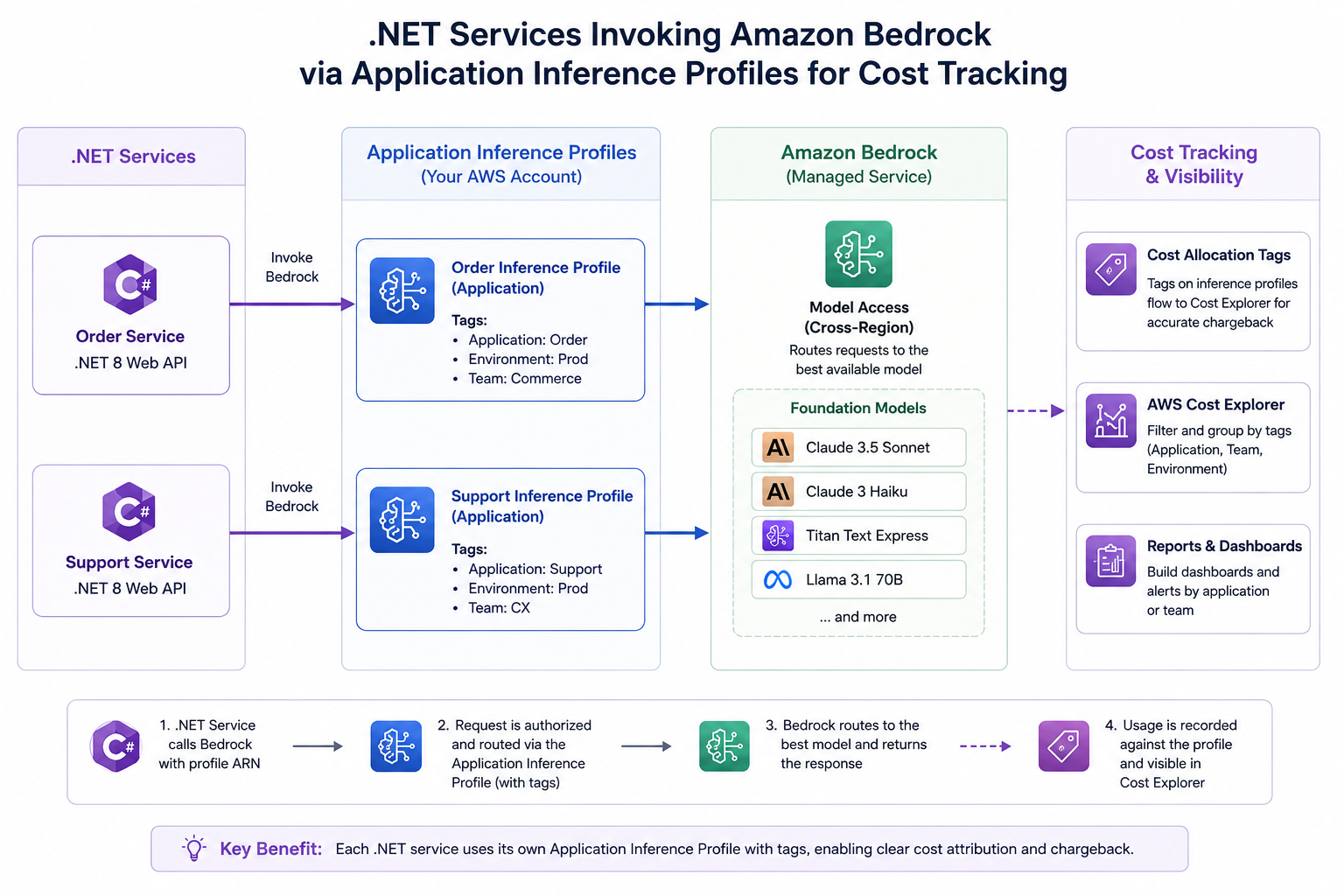
2. When and Why Are We Doing This? (Application-Level Cost Tracking)
When to adopt this pattern
- When multiple AI features share the same Bedrock account and region.
- When teams need showback or chargeback between business units.
- When you run separate environments (dev, staging, prod) and want clean spend boundaries.
- When your product managers need usage-to-value comparisons per feature, not just total AI spend.
- When finance requires auditable allocation using tags and cost reports.
Why this is application-level, not only account-level
Account-level reporting is useful for cloud governance, but product teams optimize at the application level. If one feature uses verbose prompts, long outputs, and high-cost models, you need to see that feature directly. Otherwise, optimization efforts are broad and ineffective.
Application-level tracking gives you practical decisions:
- Should this feature move from a larger model to a smaller model?
- Should we cap output tokens in this workflow?
- Which prompt templates are expensive relative to user value?
- Which environment leaked unexpected traffic?
3. How Are We Doing It?
We will implement this in three layers: profile creation, profile tagging, and profile-based invocation from .NET. You can create profiles manually for quick setup or through CloudFormation for repeatable infrastructure.
Approach A: Manual Inference Profile Creation (Console + CLI)
This is the fastest way to validate your design. Use it first when you are proving naming conventions and tag strategy with stakeholders.
- Open AWS Console and navigate to Bedrock inference profile management.
- Create a profile with a clear workload-oriented name.
- Select the model routing target as required by your workload.
- Attach standard tags during creation.
- Copy the generated profile identifier for app configuration.
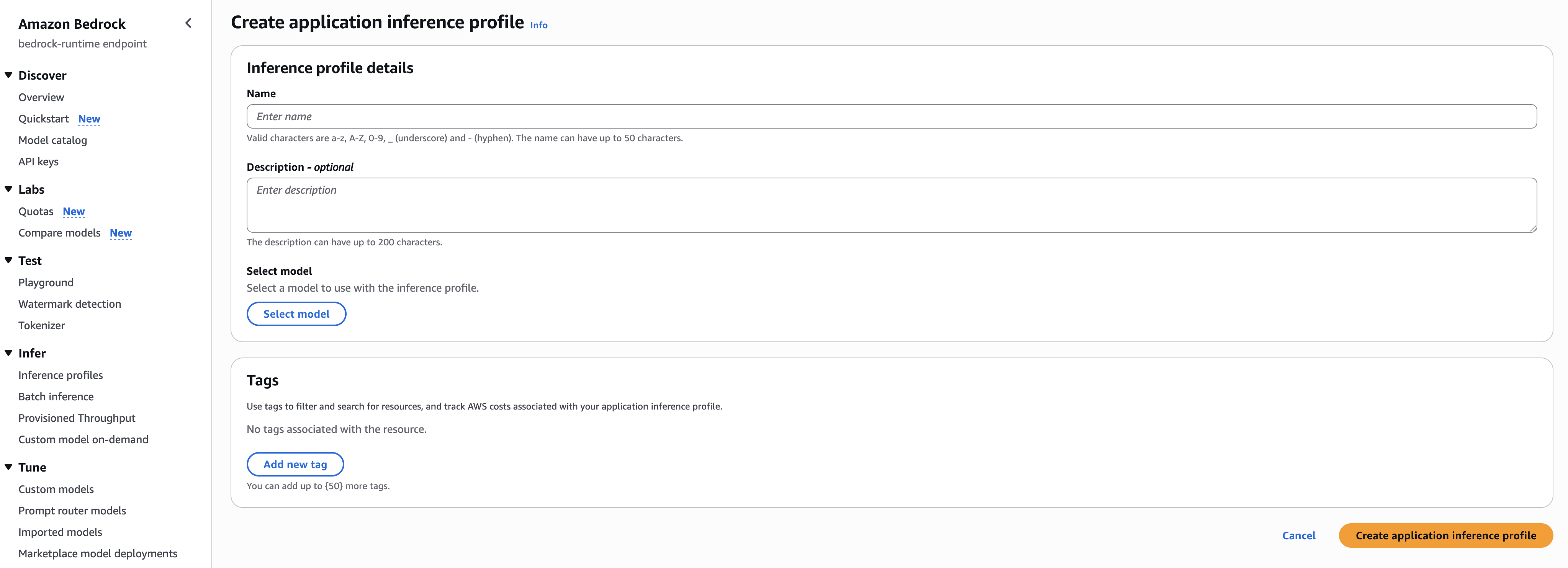
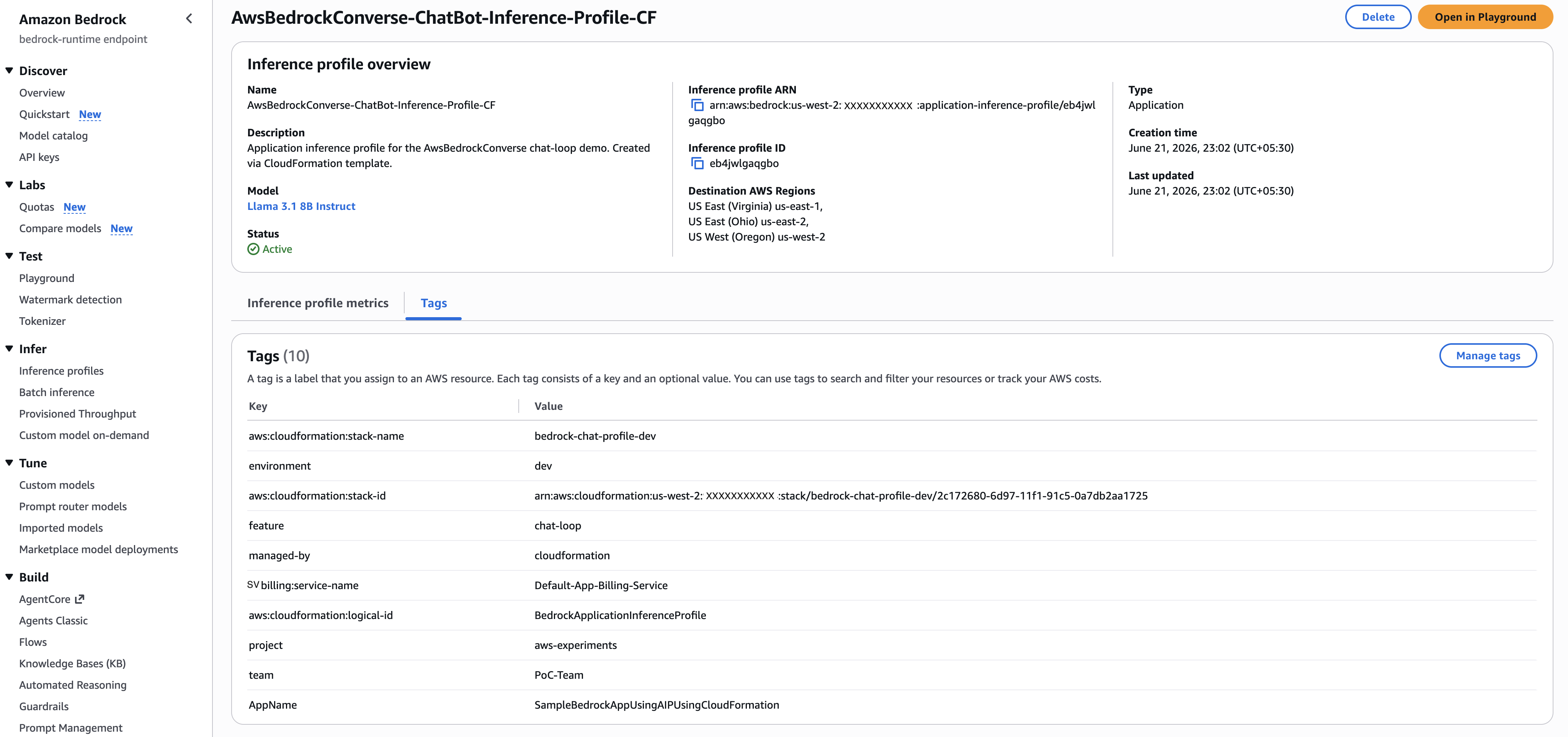
You can also do a similar operation with CLI for scripted experimentation:
aws bedrock create-inference-profile \
  --inference-profile-name support-bot-prod \
  --description "Inference profile for support assistant in production" \
  --model-source copyFrom=arn:aws:bedrock:us-east-1::foundation-model/anthropic.claude-3-haiku-20240307-v1:0

aws bedrock tag-resource \
  --resource-arn arn:aws:bedrock:us-east-1:123456789012:inference-profile/support-bot-prod \
  --tags key=environment,value=prod key=application,value=support-bot key=cost-center,value=cc-410
Code Sample #1 : Example CLI flow to create and tag an inference profile (illustrative)Approach B: Creation via CloudFormation (recommended for production)
Manual creation is useful for discovery. Production systems should move to Infrastructure as Code so profile names, tags, and routing definitions stay consistent across environments and accounts.
A typical CloudFormation template captures:
- Profile logical name and human-readable name.
- Model source or routing reference.
- Environment-aware tags.
- Outputs for profile identifiers consumed by application configuration pipelines.
# yaml-language-server: $schema=https://s3.amazonaws.com/cfn-resource-specifications-us-east-1-prod/schemas/2.15.0/all-spec.json
AWSTemplateFormatVersion: "2010-09-09"
Description: >
    Creates an AWS Bedrock Application Inference Profile by copying from a
    foundation model or system-defined cross-region inference profile.
    Deploy once per environment; the output ARN can be dropped straight into
    AwsBedrockConverse as the modelId argument.

Parameters:
    InferenceProfileName:
        Type: String
        Description: >
            Display name for the application inference profile.
            Allowed characters: alphanumeric, space, hyphen, underscore.
            Max 64 characters.
        Default: AwsBedrockConverse-ChatBot-Inference-Profile-CF
        AllowedPattern: "^([0-9a-zA-Z][ _-]?)+$"
        MinLength: 1
        MaxLength: 64

    InferenceProfileDescription:
        Type: String
        Description: Human-readable description of what this profile is used for.
        Default: Application inference profile for the AwsBedrockConverse chat-loop demo. Created via CloudFormation template.
        AllowedPattern: "^([0-9a-zA-Z:.][ _-]?)+$"
        MinLength: 1
        MaxLength: 200

    CopyFromArn:
        Type: String
        Description: >
            ARN of the foundation model or system-defined cross-region inference
            profile to copy into this application profile.
        Default: "arn:aws:bedrock:us-west-2:XXXXXXXXXX:inference-profile/us.meta.llama3-1-8b-instruct-v1:0"

    Environment:
        Type: String
        Description: Deployment environment label (used in resource tags).
        Default: dev
        AllowedValues: [dev, staging, prod]

    BillingServiceName:
        Type: String
        Description: Billing cost-allocation tag value.
        Default: Default-App-Billing-Service

    TeamName:
        Type: String
        Description: Team or squad that owns this resource.
        Default: PoC-Team

Resources:
    BedrockApplicationInferenceProfile:
        Type: AWS::Bedrock::ApplicationInferenceProfile
        Properties:
            InferenceProfileName: !Ref InferenceProfileName
            Description: !Ref InferenceProfileDescription
            ModelSource:
                CopyFrom: !Ref CopyFromArn
            Tags:
                - Key: environment
                    Value: !Ref Environment
                - Key: SV:billing:service-name
                    Value: !Ref BillingServiceName
                - Key: team
                    Value: !Ref TeamName
                - Key: feature
                    Value: chat-loop
                - Key: managed-by
                    Value: cloudformation
                - Key: project
                    Value: aws-experiments
                - Key: AppName
                    Value: SampleBedrockAppUsingAIPUsingCloudFormation

Outputs:
    InferenceProfileId:
        Description: Unique identifier of the created application inference profile.
        Value: !GetAtt BedrockApplicationInferenceProfile.InferenceProfileId
        Export:
            Name: !Sub "${AWS::StackName}-InferenceProfileId"

    InferenceProfileArn:
        Description: >
            Full ARN of the inference profile.
        Value: !GetAtt BedrockApplicationInferenceProfile.InferenceProfileArn
        Export:
            Name: !Sub "${AWS::StackName}-InferenceProfileArn"

    InferenceProfileStatus:
        Description: Status of the inference profile (ACTIVE once ready).
        Value: !GetAtt BedrockApplicationInferenceProfile.Status

    CreatedAt:
        Description: Timestamp when the inference profile was created.
        Value: !GetAtt BedrockApplicationInferenceProfile.CreatedAt
Code Sample #2 : CloudFormation template for application inference profile with cost allocation tags (guardrails excluded)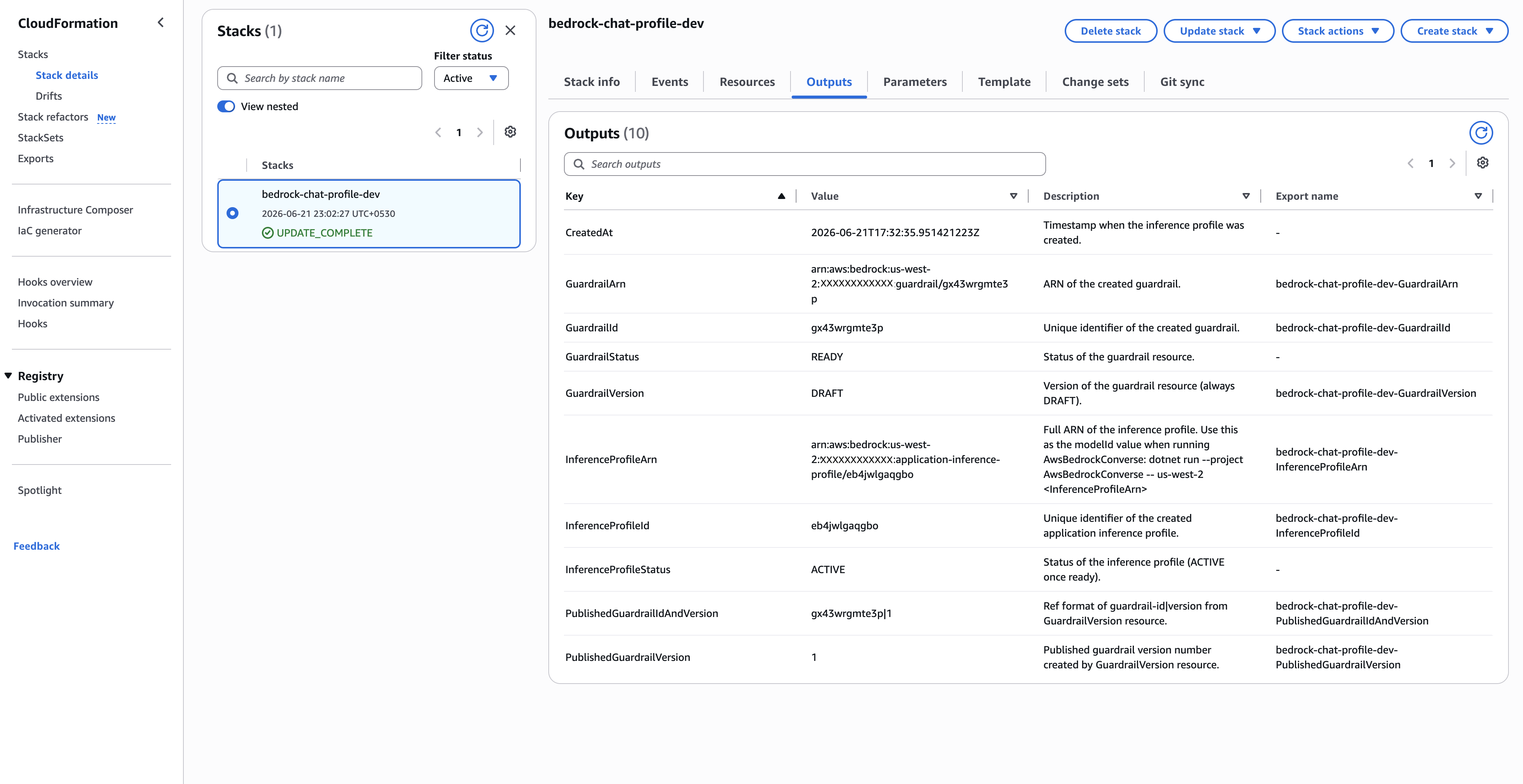
Tagging Strategy for Cost Attribution
Tags are the bridge between technical usage and financial reporting. A profile without tags is like a transaction without metadata: it happened, but you cannot classify it reliably.
The screenshot shows both the tags you define and the tags CloudFormation adds automatically. Start with a small, mandatory taxonomy for the tags you control:
- environment: dev.
- SV:billing:service-name: Default-App-Billing-Service.
- team: PoC-Team.
- feature: chat-loop.
- managed-by: cloudformation.
- project: aws-experiments.
- AppName: SampleBedrockAppUsingAIPUsingCloudFormation.
CloudFormation also injects the resource lineage tags you see in the console, such as aws:cloudformation:stack-name, aws:cloudformation:stack-id, and aws:cloudformation:logical-id. Keep the user-defined values stable and lowercase where possible.
{
  "requiredTags": [
    "environment",
    "SV:billing:service-name",
    "team",
    "feature",
    "managed-by",
    "project",
    "AppName"
  ],
    "allowedEnvironments": ["dev", "staging", "prod"],
    "notes": [
        "AppName matches the screenshot and can stay in PascalCase.",
        "CloudFormation adds aws:cloudformation:* tags automatically."
    ]
}
Code Sample #3 : Suggested tag policy contract for inference profilesUsing the Inference Profile in .NET
Creation and tagging are only half the story. To make attribution real, your application must invoke Bedrock through the profile identifier, not by directly coupling to a model identifier in each feature.
using Amazon.BedrockRuntime;
using Amazon.BedrockRuntime.Model;

var client = new AmazonBedrockRuntimeClient(Amazon.RegionEndpoint.USEast1);

string inferenceProfileId = configuration["Bedrock:InferenceProfileId"]
    ?? throw new InvalidOperationException("Bedrock:InferenceProfileId is not configured.");

var request = new ConverseRequest
{
    ModelId = inferenceProfileId,
    Messages = new List<Message>
    {
        new()
        {
            Role = "user",
            Content = new List<ContentBlock>
            {
                new() { Text = "Summarize this support ticket in 3 bullet points." }
            }
        }
    },
    InferenceConfig = new InferenceConfiguration
    {
        MaxTokens = 300,
        Temperature = 0.2f
    }
};

var response = await client.ConverseAsync(request);
string output = response.Output.Message.Content.FirstOrDefault(c => c.Text != null)?.Text ?? string.Empty;
Code Sample #4 : Converse request in .NET using inference profile ID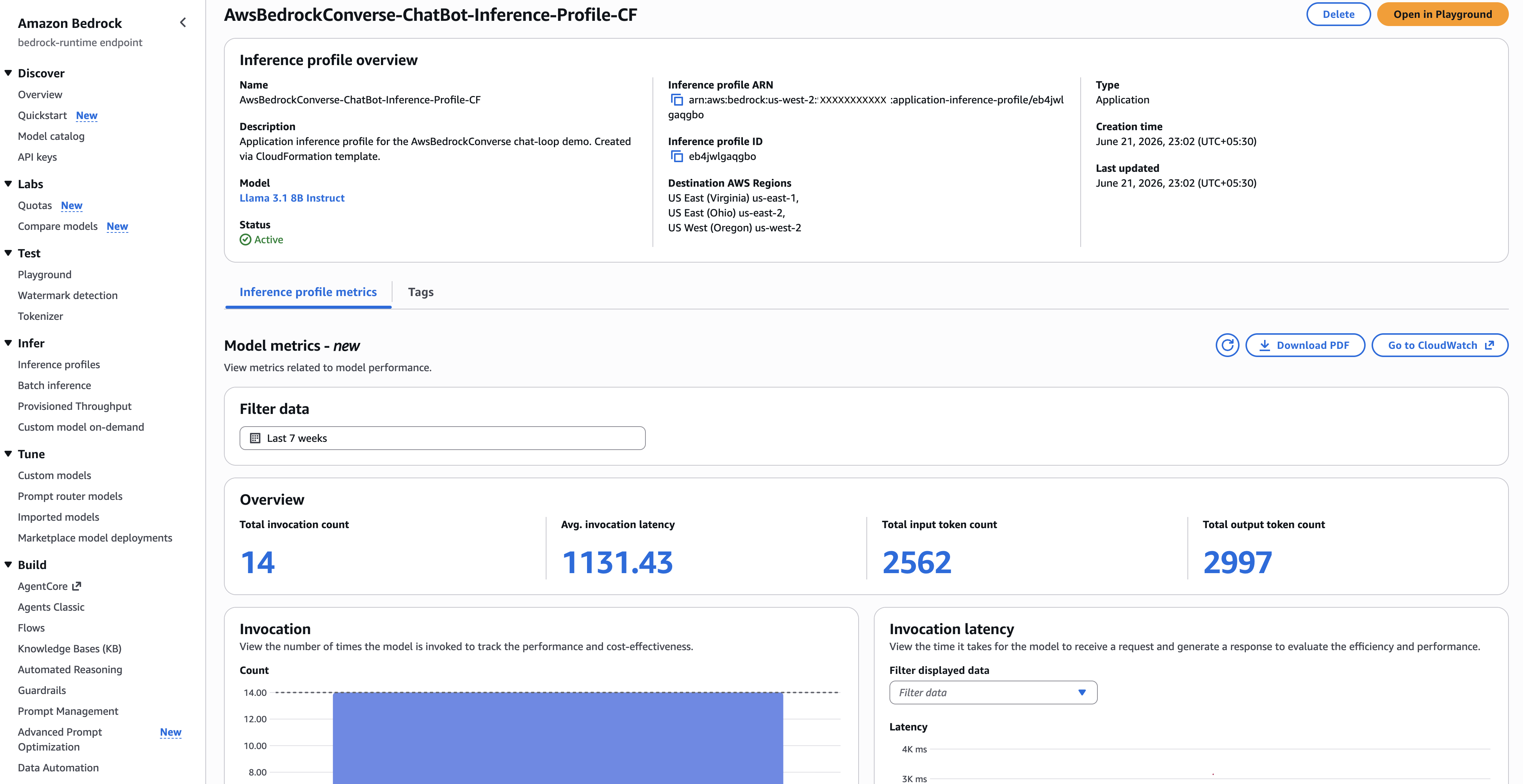
Operational Checklist
- Create separate profiles for each environment at minimum.
- Require tags at creation time and block untagged resources in CI validation.
- Store profile IDs in configuration per environment, not hardcoded in source.
- Track token usage metrics and correlate with tag-based cost reports weekly.
- Review top-cost profiles monthly and optimize prompt length, output caps, or model class.
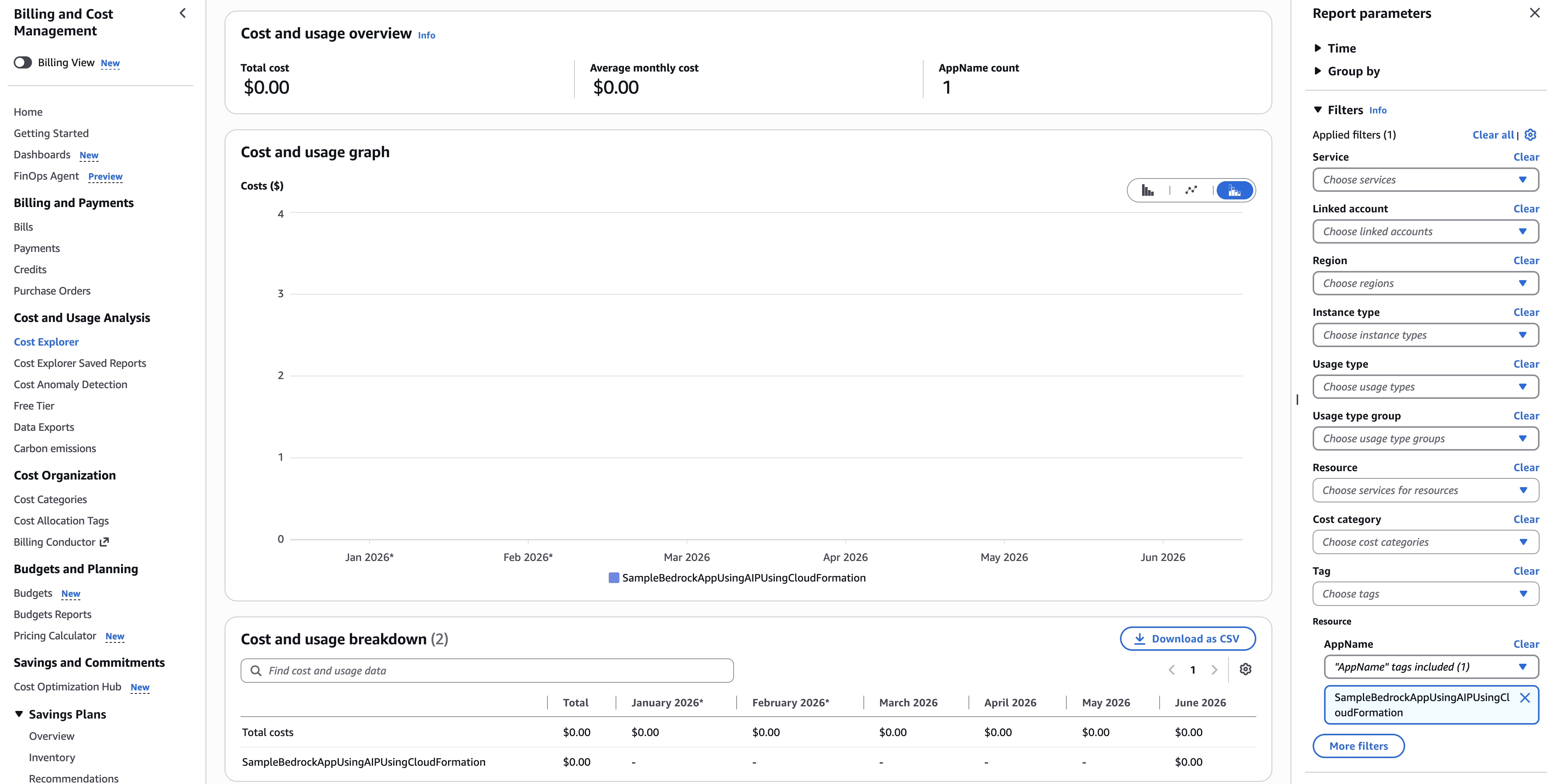
Once this setup is in place, validate attribution in Cost Explorer by filtering with the same AppName tag value used on the inference profile. This closes the loop between runtime invocation traffic and finance reporting.
Summary
Application-level Bedrock cost tracking becomes much clearer when you standardize on inference profiles and tags. You are not just creating a billing view; you are building a feedback loop for product decisions.
- What we did: Designed cost attribution through inference profiles for foundation model traffic.
- When and why: Used this pattern whenever multiple AI workloads need clean ownership and optimization accountability.
- How we did it: Covered manual profile creation, CloudFormation-based provisioning, and mandatory tagging strategy, plus .NET invocation through profile IDs.
With this setup, the next time finance asks "where did the spend come from?", your answer is not a guess. It is a report.
References & Further Reading
Thanks for reading through. Please share feedback, if any, in comments or on my email ajay.a338@gmail.com